Audio sync for Premiere Pro

Every clip in sync.
One click.

Kairos lines up your recorder, lav and boom audio with every video clip on the timeline, by waveform or by timecode, accurate to a fraction of a millisecond.

For Windows and macOS · Premiere Pro 2021 and later

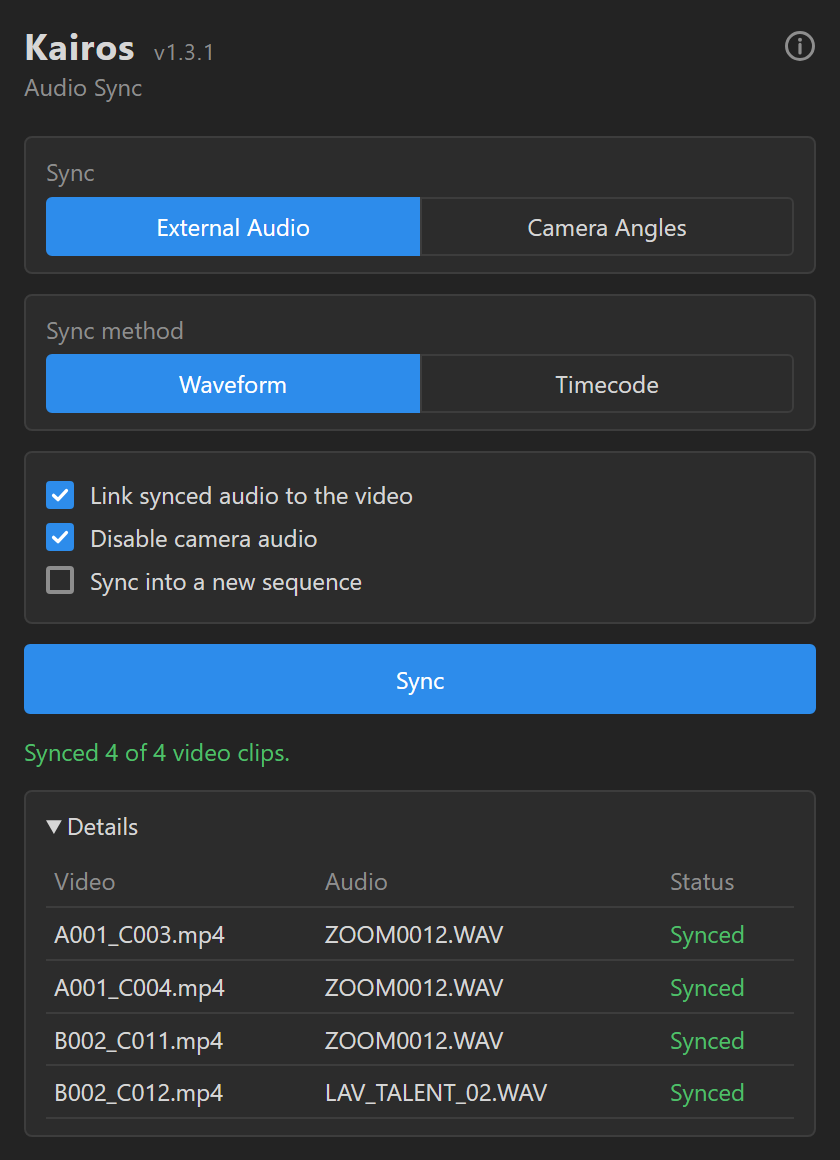
The Kairos panel in Premiere Pro after syncing four video clips

Three steps. No manual nudging.

No clapperboard, no hunting for the spike in the waveform. Kairos does the matching for you.

Select your clips

Select the video clips and the external audio on the timeline. You can select everything at once.

Choose a method

Waveform matches the sound itself. Timecode uses the start time recorded in your files.

Click Sync

Each video gets its matching piece of audio, placed right under it on a free track.

Built for real shoots

Multiple cameras, long recordings, mismatched mics. Kairos handles the messy parts.

Waveform matching

Compares camera audio with the external recording, even when the mics, levels and EQ are completely different.

Timecode sync

Reads timecode from Premiere or straight from the file (BWF and video). Supports drop-frame and recordings that cross midnight.

One recording, many clips

A single long recording is split automatically, and each video clip gets exactly the part that was recorded with it.

Never overwrites

Synced audio goes on a free track, and a new track is added when needed. Your existing clips stay untouched, and everything can be undone.

Sample-accurate

Fine alignment to under a millisecond, with phase-inversion detection, so dialogue never sounds doubled or hollow.

Your workflow, your way

Link the synced audio to the video, mute the camera audio, or sync into a new copy of the sequence and keep the original as it was.

Get Kairos

Install it once. Kairos tells you when a new version is out
and updates itself with one click.

Premiere Pro 2021 (v15) or later Windows 10/11 · macOS (Apple Silicon & Intel) FFmpeg included

Questions

Will Kairos change or delete my clips?

No clip is ever overwritten. Synced audio is placed on a free track, and a new track is added if needed. The original external audio clips are removed from the timeline because the synced pieces replace them, but the files stay in your project. Every sync can be undone with Ctrl+Z / Cmd+Z.

What if my clips are only a few seconds long?

Kairos also listens to the source material around each clip, up to a minute before and after, so even very short clips sync reliably.

What happens when a match isn't clear?

Kairos never guesses. A clip whose match isn't reliable is left as it is and marked "No reliable match" in the results, so you know exactly which ones to check.

Do I need timecode on set?

No. Waveform mode works with any camera that records scratch audio. If your camera and recorder share timecode, Timecode mode is available too.

How do I install it?

Run the installer for your system, then restart Premiere Pro and open Window > Extensions > Kairos. Because the installer isn't signed yet, Windows or macOS may ask you to confirm the first time you run it.

How do updates work?

When a new version is available, the panel shows a short notice with an Update button. One click downloads and installs it.